9 min read
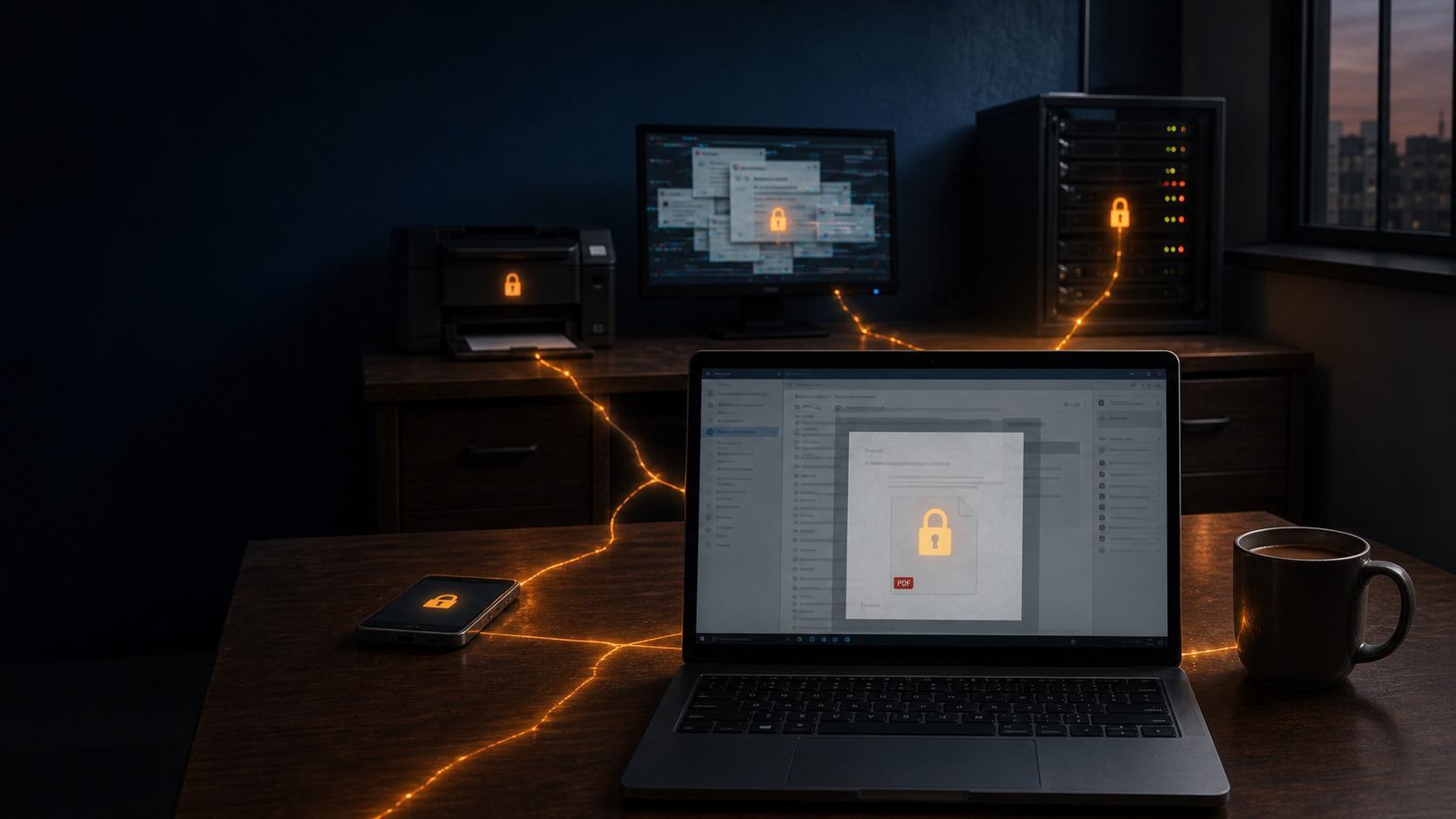
The malware that takes a business offline rarely looks dangerous. It usually arrives as an invoice from a supplier you deal with every week, or a free PDF tool someone downloaded to save ten minutes.
The government's Cyber Security Breaches Survey 2026 found that 43% of UK businesses had a breach or attack in the past year. For medium-sized firms, the figure was 65%. Only a quarter had a formal plan for dealing with one.
This guide explains the 12 types of malware you're most likely to encounter and how each one can get into a business. It also covers how to protect yourself and what to do in the first hour if you think you've been hit. You don't need an IT background to follow any of it.
What is Malware?
Malware is short for malicious software. It's any program or piece of malicious code written to steal data or gain unauthorised access to computer systems, usually without the user's knowledge.
Computer viruses were the original version, and "virus" is still the term most people use for it. Viruses are now a small part of the problem, though. Most malware attacks today are about money: encrypting your files for ransom, or quietly stealing login credentials and selling access to your network to another criminal group.
The different types of malware matter because they behave differently. Antivirus software that catches a well-known virus may do nothing against an attack that uses legitimate system tools already sitting on the machine. Once you know which malware threats you're exposed to, you know where to spend your money.
The 12 types of malware
1. Ransomware
Ransomware encrypts files across your network and demands payment for the key to unlock them. Modern ransomware gangs also steal a copy of your data first, so even if you restore everything from backup, they can threaten to publish it.
Ransomware attacks usually start with a phishing email or a stolen remote access login. The attackers often sit quietly on the network for days or weeks, identifying backups and the most sensitive data before triggering the encryption.
The survey puts ransomware at 1% of UK businesses in 2026, which sounds low. The damage when it does land is severe. Marks & Spencer estimated its 2025 attack cost it around £300 million in lost profit. For a 50-person firm, a week without systems means paying full wages while nothing goes out of the door.
2. Computer viruses
A virus attaches itself to legitimate files or programs and spreads when those files are opened. It needs user interaction to run: someone has to open the infected files or launch the program.
Viruses were the headline threat in the early 2000s. They're less common now, but they still turn up in email attachments and pirated software. Any reliable antivirus product will catch the well-known ones, which is why they rarely cause serious harm in a business that keeps its security software up to date.
3. Worms
Worms spread on their own. A virus waits for someone to click. Worms exploit vulnerabilities in operating systems and network services to copy themselves from one machine to the next, with no human involved.
WannaCry in 2017 was a worm carrying ransomware. It took out parts of the NHS within hours because unpatched Windows machines enabled it to jump between devices on the same network. Microsoft had released the fix two months earlier.
The defence is dull but effective. Patch vulnerabilities quickly, and don't leave old, unsupported machines on the network because "they still work".
4. Trojans
A Trojan pretends to be something useful. It might be free software from a download site, or a "required" browser update that pops up on a compromised website. Once it's installed, it opens a back door so attackers can gain access whenever they like.
Remote access trojans (RATs) give the attacker full control of the infected device. They can watch the screen and copy files off it while the user carries on working. Trojans are among the most common starting points for larger attacks because they give criminals a foothold they can return to later.
5. Spyware
Spyware watches what you do and reports back. It tracks browsing habits and captures sensitive information typed into forms, all without the user's knowledge.
Some spyware comes bundled with free software, and the licence agreement nobody reads technically asks for permission. For a business, the risk is data theft. Client records and the contents of every email sent from that machine can end up with someone you've never met. If that includes personal data, it can also become a data breach you have to report.
6. Adware
Adware floods a device with unwanted advertisements and pop-ups to generate revenue for its creators. A lot of it is more of a nuisance than a threat.
The problem is adware that redirects users to malicious websites or serves ads that install other malware when clicked. If a member of staff complains about unwanted ads appearing on their laptop, treat it as a sign that something has been installed that shouldn't have been. It's rarely the last thing you'll find on that machine.
7. Keyloggers
A keylogger records every key pressed. That includes every password and every bank login typed on that machine.
Keyloggers can be software, usually delivered via a Trojan, or small physical devices plugged between a keyboard and a PC. For finance teams, this is the one to worry about. The fix is to enable multi-factor authentication on anything important, because a stolen password is far less useful to an attacker who also needs a code from your phone.
8. Infostealers
Infostealers are among the fastest-growing types of malware and the ones most business owners haven't heard of. They're built to steal sensitive information in bulk, especially saved browser passwords and the session cookies that keep you logged in to websites.
Those cookies matter because an attacker can use them to skip the login screen and the MFA prompt entirely. The stolen logins are then sold on criminal marketplaces, and the buyer is often a ransomware gang looking for a way in.
Infostealers usually arrive through fake software downloads and malicious ads in search results. If staff use personal devices for work or save work passwords in their personal browser profiles, that is where you're exposed.
9. Rootkits
A rootkit hides deep within the operating system so other malware can run undetected. Standard security software struggles here because the rootkit can tamper with what the scanner sees.
Rootkits are less common in small-business attacks, but they're among the most dangerous malware to deal with because they're so hard to detect. Malware removal for a rootkit usually means wiping the machine and rebuilding it from scratch.
10. Botnets
A botnet is a network of infected computers controlled by one attacker. Your PC becomes one "bot" among thousands, used to send spam or knock other websites offline.
You might never notice. Warning signs include a connection that suddenly slows for no obvious reason and your domain appearing on email blacklists, so your legitimate emails start bouncing. Neither is proof on its own, but both are worth investigating.
11. Fileless malware
Fileless malware runs in memory without installing anything on the disk. It uses legitimate system tools already on every Windows PC, such as PowerShell, to execute malicious code.
Because there are no malicious programs sitting on the disk, traditional antivirus software that scans computer files for known threats often misses it completely. This is why endpoint detection and response (EDR) has largely replaced basic antivirus for businesses. EDR watches user behaviour and system activity, so it can spot a legitimate tool being used in an illegitimate way.
12. Mobile malware
Mobile devices are now part of your network, and attackers know it. Mobile malware usually arrives through text messages with suspicious links, or fake apps downloaded from outside the official app stores.
If staff check work email on their own phones, those phones have the same access as their laptops. Microsoft Intune, or a similar tool, lets you set rules for which devices can connect. It also lets you wipe company data from a lost phone without touching anyone's personal photos.
Types of Malware at a Glance
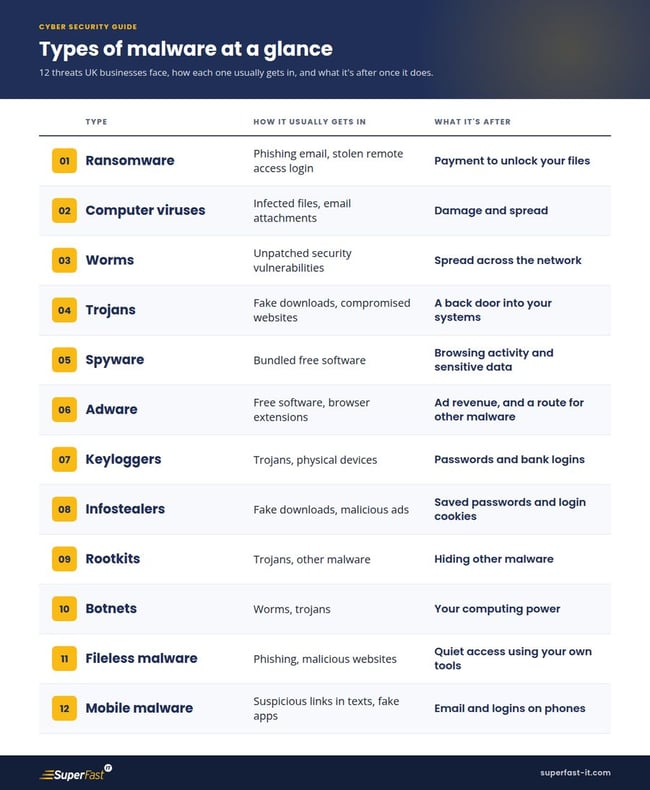
How Malware Gets Into a Business
Almost all of the harmful malware above comes in through a small number of routes. Knowing them tells you where to put your defences.
Phishing emails are the main ones. The 2026 survey found phishing was the most disruptive type of breach for 69% of businesses that had one:
-
Malicious attachments (usually fake invoices or "scanned documents") and links to compromised websites cause most of the damage. If you want to know what to look for, our guide to what phishing is walks through real examples.
-
Unpatched software is the second. Worms and many trojans exploit vulnerabilities that already have a fix available. The attack works because nobody installed the update.
-
Downloading files from the wrong place is the third. Free software and "cracked" versions of paid apps are a common source of infostealers and adware. Executable files from unknown websites should be blocked by default on business machines.
-
Weak remote access is the fourth. Leaving a remote desktop open to the internet or a VPN account without multi-factor authentication lets an attacker log in straight away with a stolen password. They don't need malware to get in, though they'll install plenty once they're there.
How to Protect Your Business From Malware
None of this needs a big budget. Most of it comes down to doing the basics every time, on every device.
Keep everything patched. Operating systems and business apps need critical updates installed within 14 days of release, a requirement also set by Cyber Essentials. Old machines that can no longer receive updates should be removed from the network.
Enable multi-factor authentication on everything that supports it, starting with Microsoft 365 and any remote access. It stops most stolen passwords from being useful.
Replace basic antivirus with proper endpoint protection. Traditional antivirus software still has a place, but modern anti-malware software needs to spot suspicious behaviour as well as known files. Look for EDR, ideally monitored by someone who'll act on an alert at 2 am.
Filter email before it reaches inboxes. A managed email security service blocks most phishing emails and malicious attachments before staff have a chance to click them.
Use strict access controls. Staff should have access to what they need for their job and nothing more. Nobody should use an admin account for day-to-day work, because malware inherits the permissions of whoever runs it.
Enable firewalls and monitor network security. Every device should have its firewall enabled, and the office should sit behind a business-grade firewall to block unauthorised access. On larger networks, intrusion detection systems flag unusual traffic, such as a PC suddenly talking to a server overseas at 3 am.
Back up properly and test it. Keep at least one copy of your data offline or immutable, so ransomware can't reach it. A backup you've never restored from is a guess.
Train your staff. Most malware needs someone to click something. Short, regular training on spotting suspicious links and fake invoices does more than one long annual session everyone forgets by lunchtime.
The NCSC's guidance on mitigating malware and ransomware attacks is a good, free reference for more detail on these topics.
Emerging Threats to Watch
The types of malware on this list change shape every year. Two trends stand out right now.
The first is AI. Criminals are using AI tools to write convincing phishing emails in perfect English and to produce new malware variants faster than signature-based antivirus software can keep up with. The spelling mistakes that used to give scams away are disappearing.
The second is the supply chain. The 2025 attack on Jaguar Land Rover shut down production for weeks and hit hundreds of suppliers across the West Midlands who had done nothing wrong themselves. Your cybersecurity now depends in part on the businesses you work with, and larger customers are starting to ask their suppliers for proof, such as Cyber Essentials, before signing contracts.
Find Out Where Your Business is Exposed
Most of the malware on this list relies on the same gaps: an unpatched laptop, a login without MFA, a backup nobody has tested, or a member of staff who hasn't been shown what a fake invoice looks like. The quickest way to find yours is our free Cyber Security Scorecard.
It's 26 questions and takes about 10 minutes. You'll get your results by email, scored across four areas, including recovery, so you know which gaps to close first. Superfast IT has been protecting businesses across Birmingham and the Black Country since 2002, and the Scorecard is the same starting point we use with new clients.
Related Posts
What Is IT Managed Services? A Guide for Small Business Owners
In today’s fast-paced digital world, small businesses face a unique set of challenges when it comes...
IT Support Help Desk Response Time - Superfast IT
How long will it take to solve our IT support issue? This is one of the most common questions we...
What is Phishing? - Superfast IT - Business Grade IT Support
A recent survey reported that 90% of organisations had been subject to a phishing attack. You may...